Replace Trade Alert with the Unusual Whales Console
The console is a single command window with your alerts streaming on one side and results on the other. It keeps Trade Alert's menus, shorthands and command names, so most of what you type today works as it is. This page shows what to type and how to bring your triggers over.
Updated 2026-10-05
Get started in three steps
- 1
Open the console
Go to unusualwhales.com/console and sign in. The left side streams your alerts live and the right side shows whatever you run. Pop out opens it in its own window next to your other screens.
unusualwhales.com/console - 2
Type a ticker
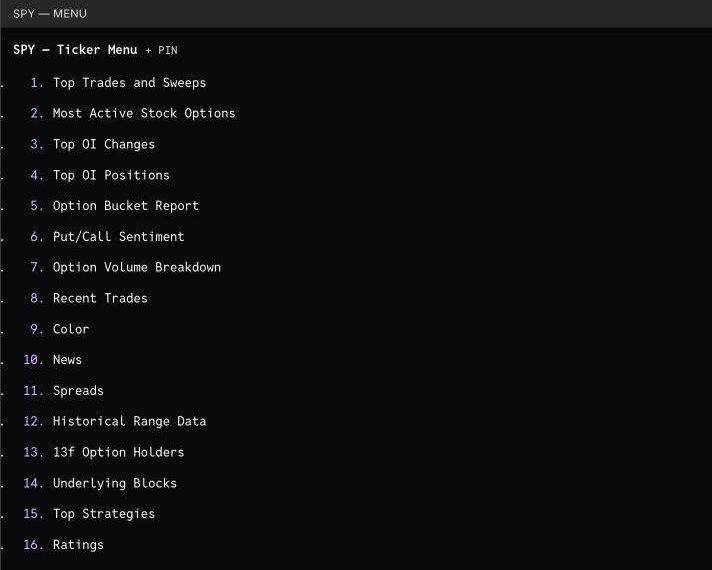
A bare ticker opens the same numbered menu Trade Alert uses. Type the number to run an item, or type both at once.
swks 1 - 3
Bring your alerts
In Trade Alert, run /list and copy the whole output. In the console, run /import and paste it. Each trigger becomes an Unusual Whales custom alert with the same name.
/import
What it looks like
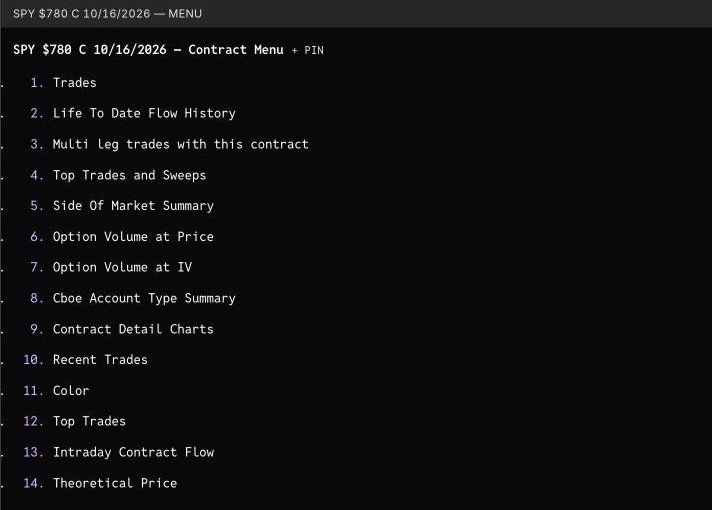
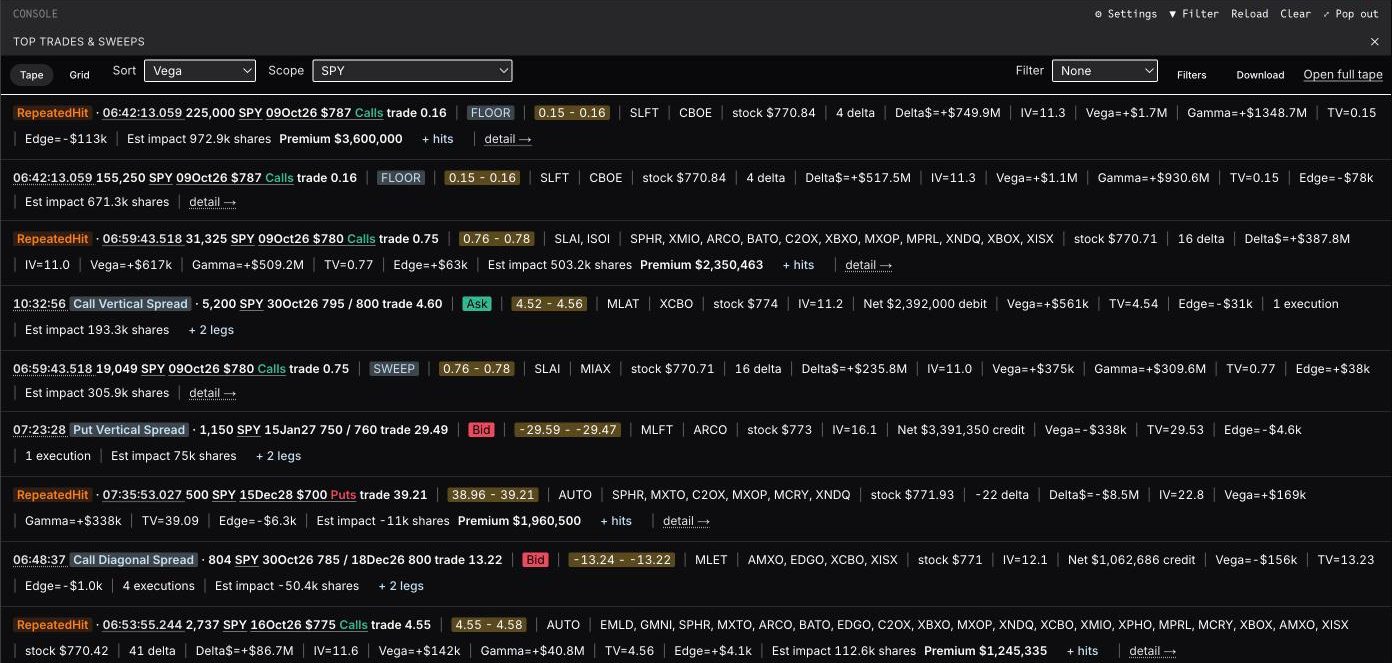
Everything runs from one command box at the bottom. Type a ticker for its menu, a contract for the contract menu, or a slash command. Esc goes back and the arrow keys recall earlier commands.
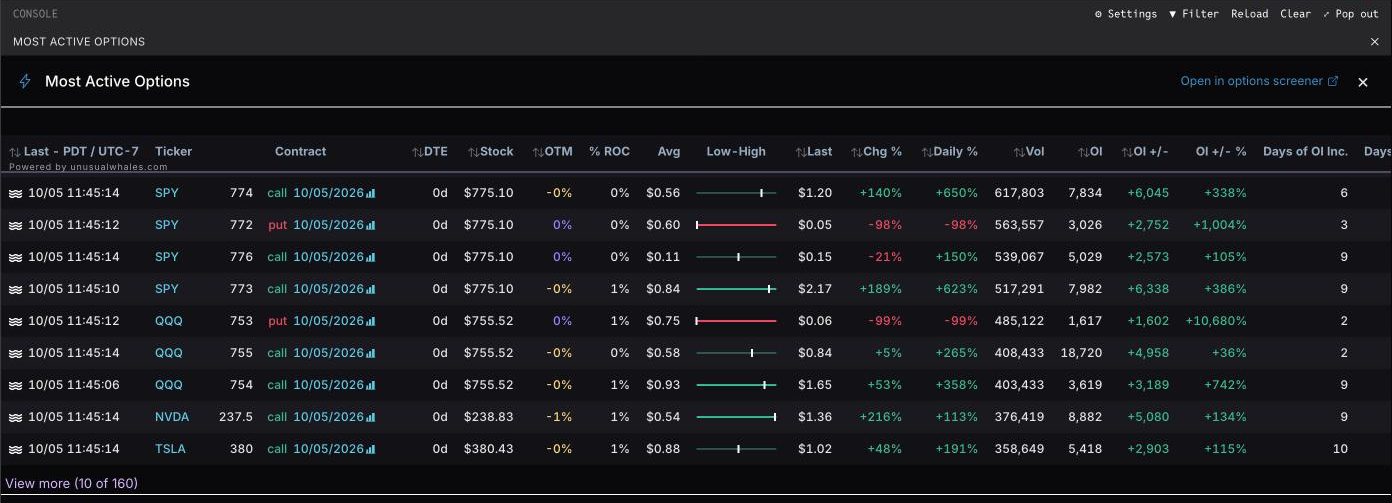
Command map
The Trade Alert habit on the left, what to type in the console in the middle. Commands are not case sensitive.
Top trades and live flow
Every flow command takes a ticker, a sector, a watchlist or a contract, then an optional date and an optional where clause.
| In Trade Alert | In the console | Notes |
|---|---|---|
| /top | /top [ticker|@sector|#watchlist] [date] [where …] | Top trades, sweeps and multi-leg structures. Market-wide when you leave out the ticker. |
| /vtop | /vtop or /vegatop | Top trades ranked by position vega. Today by default, add a date for history (/vtop amd 9/18). |
| /recent | /recent nvda | Most recent trades for a ticker. |
| /floor, /cross | /floor, /cross | Floor and cross trades, flagged from the OPRA condition code. |
| Cancelled trades | /cancel | Most recent cancelled or modified trades. |
| Exchange views | /cboe, /phlx, /arca, /ise … | Live flow on one exchange. 18 exchanges in all. |
| /jan27 | /oct26, /nov26 … | Flow for a monthly expiry, generated for the next 18 months. |
| Trades at a timestamp | /at GOOGL 13:51:33.638 9/8 | Every print and structure at that instant (Eastern). Click a row's time in /top to get here. |
| Historical day or range | /top insw 8/27 or /top insw 8/25..8/27 | Dates also work as 8/27/26, 2026-08-27 or 20260827, on every flow command. |
where clauses and sorting
Terms after where are joined by spaces, commas or and. An unknown term returns an error, so a typo never silently widens your results.
| In Trade Alert | In the console | Notes |
|---|---|---|
| where premium>=250000 | where premium>=250k | Ranges on dte, premium, size, volume, oi, strike, price, delta and iv. Amounts take k and m. |
| where expiry=20260918 | where expiry=9/18 | Either date form works. |
| Flags | calls, puts, sweep, floor, cross, otm, opening, opex, multi, single, ask, bid, mid, flex | Bare words in the where clause. |
| Sort | where sort=vega | Also gamma, gross_vega, gross_gamma, gross_notional, prem, size, volume, oi and time. The Sort control in the pane does the same. |
| Example | /top googl where premium>=250k and calls and expiry=9/18 | Combine as many terms as you need. |
Baskets and watchlists
Trade Alert baskets map to sectors and your Unusual Whales watchlists. A single @name that isn't a sector is read as your watchlist of that name.
| In Trade Alert | In the console | Notes |
|---|---|---|
| /top @ENER | /top @energy | Sector scope. Join several with +, for example @tech+health. |
| /top @w | /top #w or /top @w | Scope any flow command to one of your watchlists. |
| @w += fmc | @w += FMC | Adds to a watchlist. @w -= FMC removes, @w = A B C replaces, @w opens it. |
| @REITS = AGNC SPG DLR NLY | /ww reits AGNC SPG DLR NLY | Creates or adds to a watchlist, then use /top #reits or /moso #reits. |
Most actives, open interest and holders
| In Trade Alert | In the console | Notes |
|---|---|---|
| /moso | /moso or /moso AGNC | Most active contracts today by volume. Market-wide, for one ticker or for a #watchlist. |
| /oi | /oi or /topoi | Top open interest positions with expiry, strike, change on the day and bid/mid/ask share. |
| Largest OI changes | /oichg, /oiup, /oidown | Top OI changes by percent, biggest raw gainers and biggest raw losers. |
| Option Bucket Report | /bucket | Net flow plus option volume by expiry and strike. |
| Option Volume Breakdown | /volbreak | Option volume by expiry and strike. |
| Life To Date Flow History | /chainhist | Contract menu item 2. Busiest sessions first. Click a day to see that day's prints. |
| /13f, 13f Option Holders | /13f, /13fo | Institutions holding the stock, and institutions holding options on it (puts, calls, % of OI). |
| /hds | /hds or /fund | A fund's latest 13F option holdings or full portfolio. Partial names work. |
| /block, Underlying Blocks | /blocks (or /qccblocks) | Dark pool and block trades in the stock. |
| Spreads | /spreads NVDA iron_condor, /topstrats NVDA | Multi-leg flow, optionally one strategy, and a ticker's spreads ranked by premium. |
Volatility and pricing
| In Trade Alert | In the console | Notes |
|---|---|---|
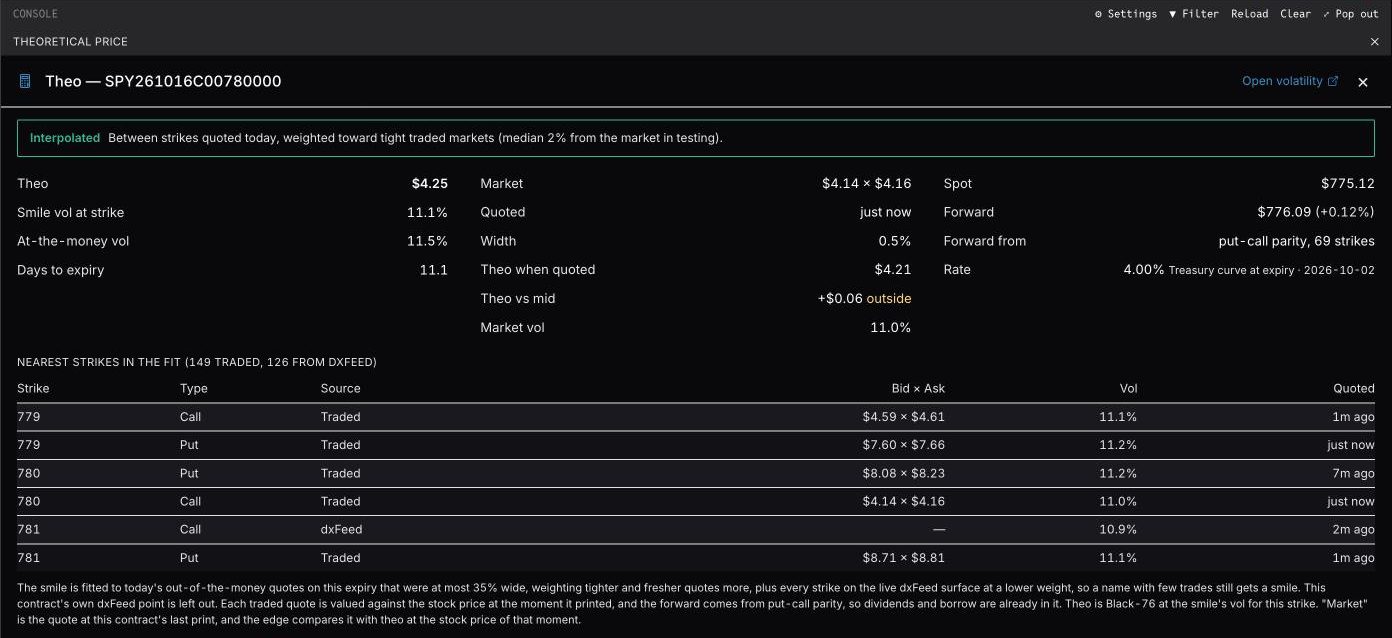
| Theo | /theo EFA Oct 100 Put | Prices the contract from the expiry's fitted smile and shows the edge against the market. Contract menu item 14. |
| Vol surface | /volsurface | IV surface by strike and expiry. |
| Term structure, skew | /ivterm, /skew, /smile, /histskew | IV by expiry, call versus put skew, IV by strike and risk-reversal skew over time. |
| Payoff and what-if | /opc (or /calc) | Options profit calculator and payoff chart. |
| Borrow | /shorts DEI | Stock-loan fee and rebate. |
Prints, export and workspace
| In Trade Alert | In the console | Notes |
|---|---|---|
| Four-line prints | ⚙ Settings → Trade-Alert style prints | Switches option-trade alerts in the tape to the four-line format. Monospace feed and call/put colouring are toggles in the same place. |
| Export /top to CSV | Download button on any flow pane | Saves the rows on screen in Trade Alert's column layout, named like U top 2026-09-23.csv. |
| /template | /template | Row templates for option alerts. Trade Alert field names are translated. |
| Pinned names | /pin, /n, /p | Pin tickers and contracts above the command box and step through them with Alt+Down and Alt+Up. |
| /list (command help) | /list, /faq or /help | Searchable list of every command, grouped by category. |
/list means something different here
In Trade Alert, /list prints your triggers. In the console, /list (also /faq and /help) opens the searchable list of every command. Your alerts are under /alerts. To move triggers across, run /list in Trade Alert and paste the output into /import.
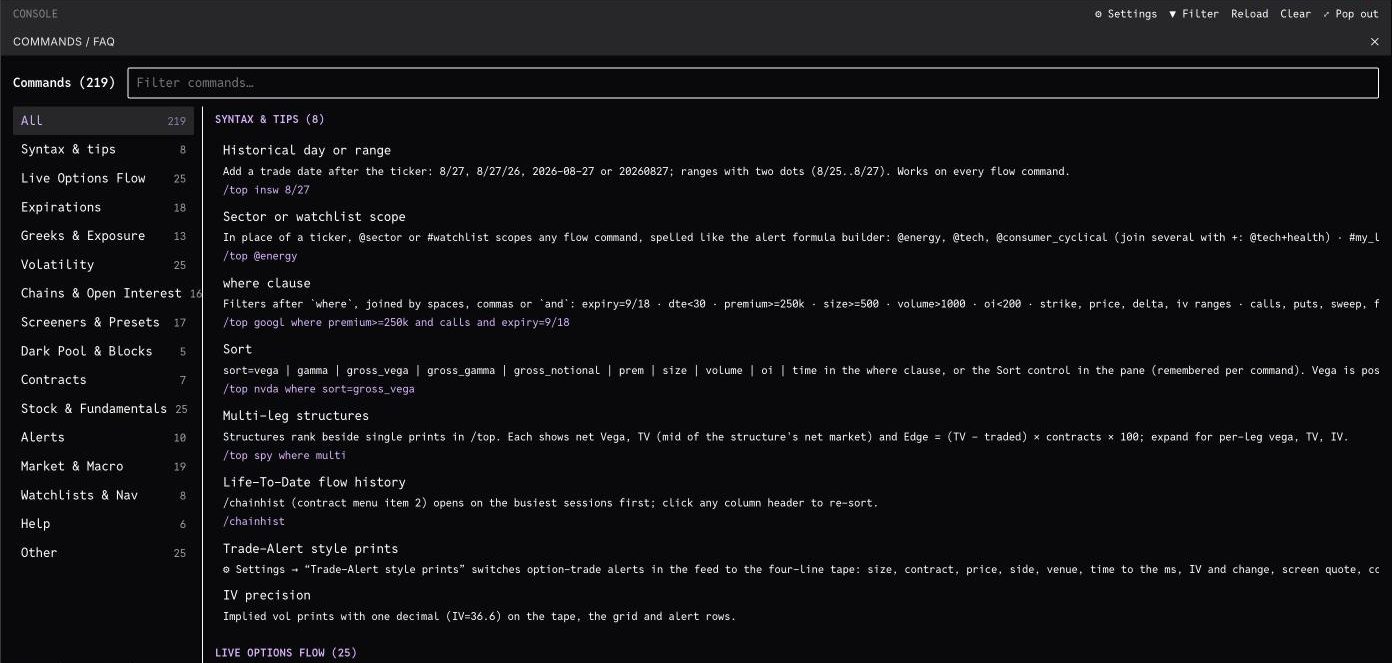
Moving your alerts
Run /list in Trade Alert, copy everything it prints, then run /import in the console and paste it. Each line becomes an Unusual Whales custom alert, and its fires stream into the console tape.
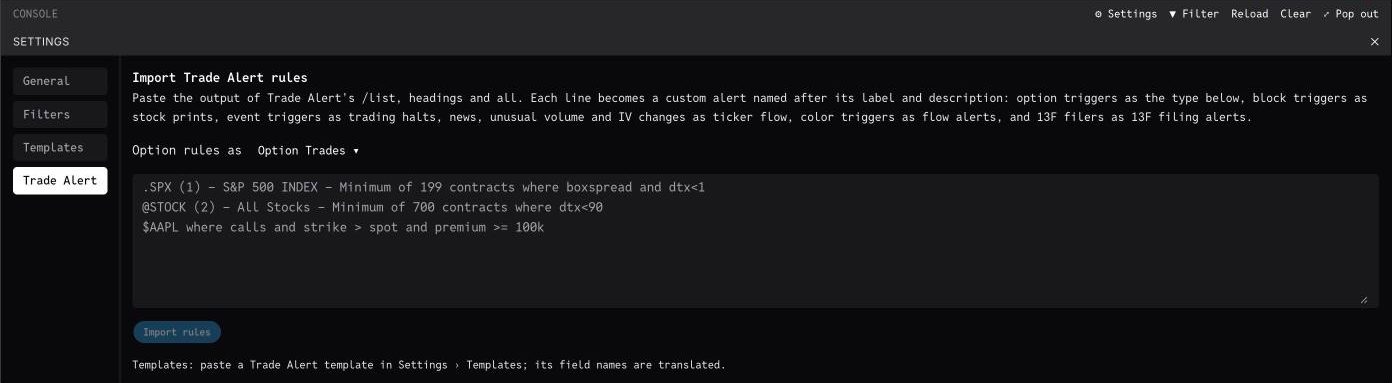
What each Trade Alert section becomes
| Trade Alert section | Unusual Whales alert |
|---|---|
| Option Triggers | Option Trades alerts by default. Pick another type before importing if you prefer. |
| Block Triggers | Stock print alerts |
| Color Triggers | Flow Alerts |
| News Triggers | News alerts |
| Unusual Volume Triggers | Ticker interval flow alerts |
| Implied Volatility Changes Triggers | Ticker interval flow alerts on IV change |
| 13f Filer Triggers | 13F filing alerts |
| Event Triggers | Trading halt and resume alerts |
| Exclude Triggers | Applied to your other rules as an excluded symbol list |
How the import reads your rules
- Paste the whole /list output, including chat headers and the Delete Copy Pause links. The importer strips them.
- Each rule keeps its Trade Alert label and description as its name, including [TAG] suffixes.
- Rules you had paused in Trade Alert are created paused.
- Basket codes map to sectors: @ENER to Energy, @IT1 to Technology, @HLTH to Healthcare, @FIN to Financial Services and so on. @STOCK, @ETF, @INDEX, @ADR and @ALL carry over as they are.
- A basket that isn't a sector is read as your watchlist of that name, so create the watchlist first (for example /ww riskarb …) and import the line as #riskarb.
- cond like clauses are dropped and flagged in the results, because Unusual Whales condition codes differ from Trade Alert's.
- One click undoes the whole import, and you can retry only the rules that failed.
Managing alerts from the console
The tape on the left shows every alert as it fires, with a backfill of what fired while you were away. Spread legs are grouped under their package, and a trade caught by several of your alerts shows once.
| In Trade Alert | In the console | Notes |
|---|---|---|
| /add | /dsl | Build an alert from a formula, for example #w where size >= 50 and not complex. |
| Push alert presets | /presets | Creates Sweeps, Big Vega, Floor Trades, Block Trades and Unusual Volume alerts in one step. |
| /list (your triggers) | /alerts | Your alerts, numbered. Pause, edit or delete each one. |
| Alert history | /alertfeed or /myalerts | What your alerts caught. |
| /filter | /filter | Choose which alerts stream into the tape. /filter clear shows them all. |
| /pause SYMBOL | /mute AAPL 1d | Silence a name for 1h, 4h, 1d, 1w or forever. /unmute and /muted manage the list. |
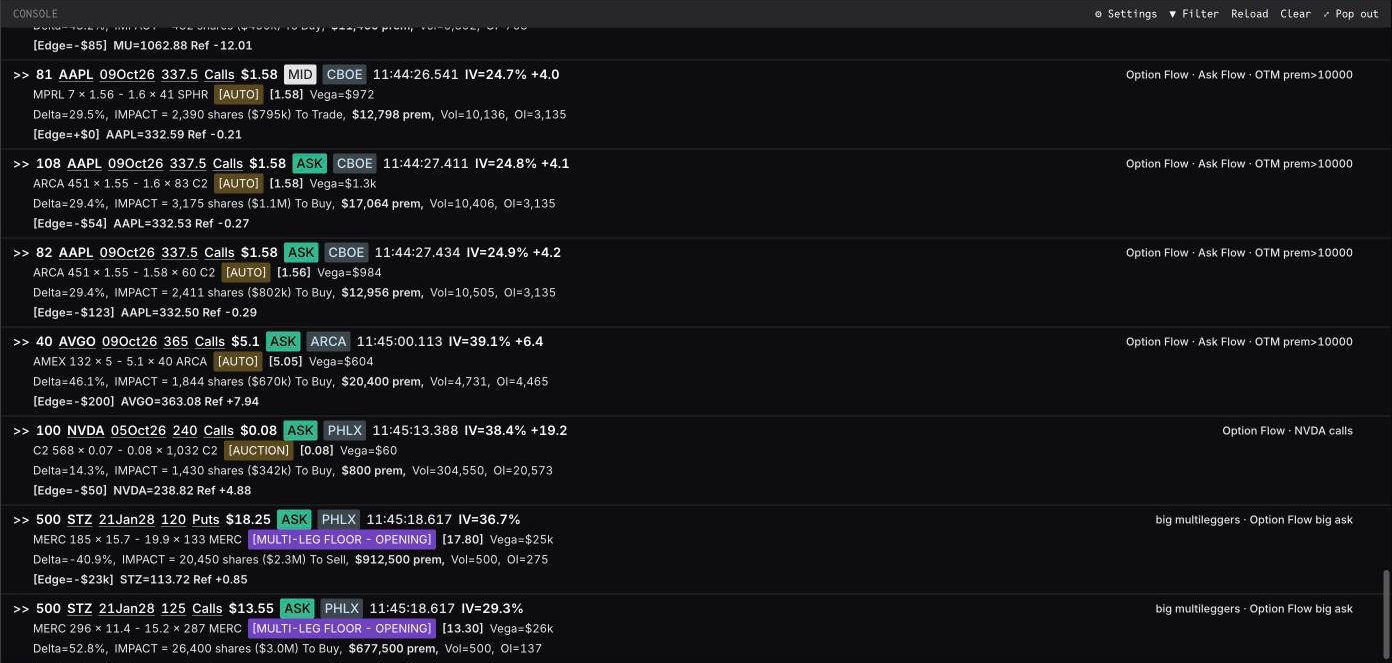
Cheat sheet
SPY                      ticker menu
SPY 1                    menu item 1 (/top SPY)
SPY 5d 2                 item 2 over the last 5 trading days
SPY -1 1                 item 1 for the previous trading day
SPY Oct 780 Call         contract menu (bare month = standard expiry)
SPY Oct 780 Call 14      contract menu item 14 (/theo)
SPY Oct 780 Call 9/30    the contract as of 9/30
/top SPY where premium>=1m sort=vega
/top @energy 8/25..8/27 where sweep and opening
/top #w where calls and dte<30
@w += FMC   @w -= FMC   @w = A B C
/import                  paste Trade Alert /list output
/list                    every console command
Known differences
A few Trade Alert features work differently or are still on the way.
- Live per-trade FLEX prints and the stock leg of tied trades are waiting on exchange approvals. Tied option prints are already tagged TIED, and /flex shows FLEX chains and open interest.
- Trade Alert's cond like filters are not supported.
- The CSV export leaves ivol_chg, spot_chg, ex_style, am_pm and settle blank, because we have no source for them yet.
- There is no prose market-color feed. Menu item 9, Color, shows net premium flow instead.
- /cats, /bsoc and /openclose need an Enterprise account.
Frequently asked
Do I have to learn new commands?+
Mostly no. The ticker and contract menus use Trade Alert's numbering, the one-liners like swks 1 and be 5/29 207.5 p 6 work as typed, and /top, /vtop, /moso, /recent, /floor and /cross keep their names. Type /list in the console for everything else.
Why does /list show commands instead of my triggers?+
In the console, /list is the command catalogue. Your alerts live under /alerts. To bring triggers over, run /list in Trade Alert and paste the output into /import.
Do my alerts fire on every print like they did in Trade Alert?+
On Professional and Enterprise accounts, Option Trades alerts have no minimum premium, so a rule fires on every print it matches. Other plans skip prints under $10,000 in premium. Use Option Trades, not Flow Alerts, for per-print rules. The formula builder warns you if a rule is on the wrong type.
Where do alerts get delivered?+
To the console tape and the alerts page as they fire, to the Unusual Whales mobile app as push notifications, and by email for the alert types that support it.
Do watchlist alerts follow changes to the watchlist?+
Yes. Adding or removing a name with @w += or @w -= updates every alert that uses #w right away. If an older alert doesn't pick up the change, open it and save it once.
Can I see past days?+
Yes. Add a date or a range to any flow command, for example /top insw 8/27 or /top insw 8/25..8/27. In /chainhist, click a day to open that day's prints.
Moving a whole desk?
We can set up accounts, import your triggers and walk your team through the console.
Comparing platforms? See Unusual Whales vs CBOE Trade Alert.