Unusual Whales vs CBOE Trade Alert
CBOE Trade Alert is being sunset. Unusual Whales delivers the same real-time options unusual activity, every command pattern users relied on, plus dark pool, congressional, and insider data.
The 30-second answer
Real-time options unusual activity with every alert pattern CBOE Trade Alert subscribers relied on — mono-leg, sweep, block, and multi-leg — plus named strategy classification for iron condors, iron butterflies, vertical / calendar / diagonal spreads, jade lizards, risk reversals, straddles, strangles, and synthetic positions (the option legs that compose conversions and reverse conversions).
Watchlists you can name, tag, and color so each one drives its own alert pipeline. Filter rules cover ticker, strike, expiry, premium, IV, OI, side classification, multi-leg structure, and time-of-day — and you can attach a separate rule set to every watchlist.
Alerts ship anywhere you want them — Discord webhook, email, in-app, mobile push, embeddable iframes, custom-built pages, raw JSON, WebSocket streams, or Kafka topics for enterprise consumers — and arrive alongside dark pool prints, congressional trades, insider Form 4 filings, and 13F institutional flows in the same feed.
A walkthrough of the flow feed, named-strategy classification, tagged watchlists, and the alert pipeline that ships to Discord, email, mobile, embeddable iframes, custom pages, REST / WebSocket, or Kafka.
Feature comparison
Verified 2026-10-05. Comparison reflects publicly available information at the time of writing.
| Capability | Unusual Whales | CBOE Trade Alert |
|---|---|---|
| Real-time options unusual activity feed | ✓ Yes | ✓ Yes |
| Mono-leg / single-leg trade alerts | ✓ Yes | ✓ Yes |
| Sweep detection | ✓ Yes | ✓ Yes |
| Block trade detection | ✓ Yes | ✓ Yes |
| Multi-leg / spread detection | ✓ Yes | ✓ Yes |
| Named strategy classification (iron condor, iron butterfly, butterfly, jade lizard, risk reversal, straddle, strangle) | ✓ Yes | — |
| Vertical, calendar, and diagonal spread classification (call & put, long & short) | ✓ Yes | — |
| Synthetic detection (long / short synthetics — the option legs of conversions and reverse conversions) | ✓ Yes | — |
| Bid / ask / mid side classification | ✓ Yes | ✓ Yes |
| Customizable filter rules | ✓ Yes | ✓ Yes |
| Named, tagged watchlists with per-watchlist alert rule sets | ✓ Yes | — |
| Per-rule alert delivery: Discord webhook, email, in-app, mobile push | ✓ Yes | ✓ Yes |
| Embeddable iframes & custom-built pages for in-house dashboards | ✓ Yes | — |
| Raw JSON payloads over REST, WebSocket streaming, and Kafka topics | ✓ Yes | — |
| Dark pool print feed | ✓ Yes | — |
| Congressional trade tracking | ✓ Yes | — |
| Insider Form 4 transactions | ✓ Yes | — |
| 13F institutional flow tracking | ✓ Yes | — |
| REST API for programmatic access | ✓ Yes | — |
| WebSocket streaming API | ✓ Yes | — |
| Import existing Trade Alert triggers (paste /list into /import, or via AI + MCP) | ✓ Yes | — |
| Kafka streaming (enterprise) | ✓ Yes | — |
| MCP integration for AI agents | ✓ Yes | — |
| Trade-Alert-style command terminal (command box + live flow tape, ticker 1–14 & contract menus) | ✓ Yes | ✓ Yes |
| 160+ terminal commands spanning options flow, greeks, volatility, dark pool, congress, insiders, and ETF / crypto data | ✓ Yes | — |
| Actively maintained | ✓ Yes | — |
Why people switch from CBOE Trade Alert to Unusual Whales
Same commands, now in the Unusual Whales Terminal
The Unusual Whales Console is live at unusualwhales.com/console: a Trade-Alert-style command window with your alerts streaming on one side and results on the other. It has 200+ commands, including the ones CBOE Trade Alert subscribers already know (/top, /vtop, /moso, /recent, /floor, /cross), the ticker (1–14) and contract menus with the same numbering, one-liners like swks 1 and be 5/29 207.5 p 6, and Unusual Whales-native commands for greeks, volatility, dark pool, congressional and insider flow. See the switching guide at unusualwhales.com/console/guide.
Bring your whole alert library in minutes
Already have a book of trade-alert configs? Point your AI assistant at the Unusual Whales MCP server, paste them in, and it translates and creates each one as a live UW alert — no manual re-entry. It speaks the trade-alert dialect natively: the @ group scopes (@stock, @index+etf), the “@GROUP (N) - … - Minimum of X contracts” header, shorthand numerics (.10, 1m), field aliases (size → contracts, dtx → dte), and every multi-leg strategy keyword (ironbutterfly, ironcondor, condor, vertical, timespread).
Strategies named, not just “spread”
Unusual Whales classifies multi-leg flow by structure: iron condors and iron butterflies, vertical / calendar / diagonal spreads, jade lizards, risk reversals, straddles, strangles, ratio spreads, and synthetic positions (the option leg pair that composes a conversion or reverse conversion). CBOE Trade Alert grouped these under one “spread” bucket. You see the actual structure, filter on it, and alert on it.
Watchlists are first-class
Every watchlist has a name, an optional tag and color, and its own rule set. Build one for earnings setups, one for repeat-hitter tickers, one for 0DTE flow — each fires its own alerts and stays separate in the feed. CBOE baskets were tickers only; UW watchlists carry the alert pipeline with them.
Pick where every alert lands
Delivery is fully customisable. Route any rule to a Discord webhook, email, in-app, or mobile push. Embed the alert feed as an iframe in your own dashboard, build a custom page on top of the API, pull raw JSON over REST, subscribe to a WebSocket stream for live updates, or consume a Kafka topic if you're enterprise. CBOE Trade Alert was a delivered feed only — one destination, fixed format. UW gives your team one source of truth and every shape it can take.
Beyond options
Dark pool prints, congressional trades, insider Form 4 filings, and 13F institutional positioning are part of the same platform, not a separate subscription.
Programmatic access
REST, WebSocket, Kafka, and MCP. Wire alerts directly into your trading bot, dashboard, or AI assistant. CBOE Trade Alert was a delivered feed only.
Long-term roadmap
Unusual Whales ships new alert capabilities and data sources regularly. CBOE Trade Alert is being wound down.
Every CBOE Trade Alert command, mapped to Unusual Whales
Every CBOE Trade Alert command, mapped to its Unusual Whales equivalent. Pulled from the official Option Alert User Manual and matched to the corresponding Unusual Whales feature, page, or API endpoint. Most of these are also live in the Unusual Whales Console at unusualwhales.com/console, so the keystrokes you already know keep working after you migrate. The switching guide at unusualwhales.com/console/guide lists the exact console syntax for each.
Recap commands (real-time activity queries)
| CBOE Trade Alert command | What it does | Unusual Whales equivalent |
|---|---|---|
/moso | Most active options in your interest list | Top Most Active Options screener, filterable by your watchlist |
/moso @etf | Most active ETF options | ETF Overview plus Most Active Options filtered to ETFs |
/top | Top trades in a ticker, group, or single option | Options Flow Feed sorted by premium or size, with ticker or group filter |
/top ibm aug10 130 c | Top trades in a single option contract | Per-contract flow on the Options Chain page or /api/option-contract/:id/flow |
/cal | Upcoming events for a ticker, sector, or basket | Earnings Calendar, Economic Calendar, FDA Calendar, dividends and splits feeds |
/bucket | Strike-bucketed statistics for a sector or symbol | Open Interest by Strike, Flow per Strike, OI Changes by Strike |
/uvol | Unusual volume within a sector or sub-sector | Unusual Options Activity feed plus Stock Screener volume filters |
/hds | 13F filings for a filer name | Institutions search and 13F holdings on the Institutions page |
/block | Top equity (block) trades | Dark Pool Feed for off-exchange blocks, plus block detection in the options flow feed |
/hashtag | News and color tagged with a given hashtag | News feed with ticker and topic filters |
Symbol menu items (1–14)
| CBOE Trade Alert command | What it does | Unusual Whales equivalent |
|---|---|---|
1. Top Trades and Sweeps | Largest recent trades on the symbol | /top TICKER in the console (menu item 1). Repeated hits and multi-leg structures rank beside single prints |
2. Most Active Stock Options | Highest-volume contracts on the symbol | /moso TICKER in the console (menu item 2) |
3. Largest Open Interest Changes | Biggest day-over-day OI shifts | /oichg TICKER in the console (menu item 3), plus the OI Changes page |
4. Top Open Interest Positions | Largest absolute OI by strike | /topoi or /oi TICKER in the console (menu item 4) |
5. Option Bucket Report | Activity grouped by money-ness and expiry | /bucket TICKER in the console (menu item 5): net flow plus option volume by expiry and strike |
6. Put/Call Sentiment | Bullish / bearish indicators and put/call ratio | /putcall TICKER in the console (menu item 6) |
7. Option Volume Breakdown | Volume by exchange and side | /volbreak TICKER in the console (menu item 7) |
8. Recent Trades | Chronological trade tape for the symbol | /recent TICKER in the console (menu item 8) |
9. Color | Market commentary tagged on the symbol | /netflow TICKER in the console (menu item 9). Unusual Whales has no prose color feed, so this shows net premium flow |
10. News | Headlines tagged on the symbol | /news TICKER in the console (menu item 10) |
11. Spreads | Multi-leg spread activity | /spreads TICKER in the console (menu item 11). Multi-leg detection in the flow feed with named strategy classification — iron condors, iron butterflies, butterflies, vertical / calendar / diagonal spreads, jade lizards, risk reversals, straddles, strangles, and long / short synthetics (the option leg pair of conversions and reverse conversions). Filter the feed by structure or alert on a specific shape from the Options Analyzer. |
12. Historical Range Data | Aggregate flow over a date range | /hp TICKER in the console (menu item 12). Flow commands also take a date or range, e.g. /top TICKER 8/25..8/27 |
13. 13f Option Holders | Institutional option positions in the underlying | /13fo TICKER in the console (menu item 13) |
14. Underlying Blocks | Block trades in the underlying stock | /blocks TICKER in the console (menu item 14), plus the Dark Pool Feed |
Alert trigger types (/add ... -type)
| CBOE Trade Alert command | What it does | Unusual Whales equivalent |
|---|---|---|
-o[ption] | Option trade alerts (default) | Options Flow Alert rules |
-b[lock] | Equity block trade alerts | Dark Pool alerts and block detection in flow alert rules |
-spread | Multi-leg spread alerts | Multi-leg / spread filter in flow alert rules, with named-strategy filters for iron condors, butterflies, verticals, calendars, diagonals, risk reversals, straddles, strangles, and synthetics |
-uvol | Unusual volume alerts | Unusual Options Activity feed and screener-driven alerts |
-ivol | Implied volatility change alerts | IV term structure and IV change tracking alerts |
-color | Market color / commentary alerts | Tagged news alerts |
-news | Headline news alerts | News alerts via /alerts and /news/headlines |
-events | Halt, earnings change, 52-week price/IV events | Trading halts feed, earnings calendar changes, 52-week event alerts |
-future | VIX and futures alerts | Futures & Indices page, /futures, /api/futures |
-f[iler] | 13F filing alerts | Institutional filing notifications via the Institutions page |
-e[xclude] | Suppress alerts for a symbol | Per-rule symbol exclude list in flow alert rules |
Trigger management
| CBOE Trade Alert command | What it does | Unusual Whales equivalent |
|---|---|---|
/add | Add a trigger | New rule on the Flow Alerts page |
/del | Delete a trigger | Delete rule from the Flow Alerts page |
/list | List current triggers | Paste the /list output into /import in the console to recreate every trigger as a custom alert. Your alerts are then listed under /alerts |
/pause | Pause alerts globally or by symbol/type | Per-rule disable toggle and account-wide pause |
/paused | List paused alerts | Disabled rules section on the Flow Alerts page |
/resume | Resume paused alerts | Per-rule enable toggle |
/filter | Set global filters for option alerts | Account-level alert filter preferences |
Filter where-clauses
| CBOE Trade Alert command | What it does | Unusual Whales equivalent |
|---|---|---|
where call / put / strike / spot | Filter by option type, strike, or spot relationship | Type, strike, ITM/OTM, and money-ness filters in flow alert rules |
where dtx / time | Days-to-expiry and time-of-day windows | Expiry window and time-of-day filters in flow alert rules |
where iv30d / iv30d_chg | ATM IV and IV change conditions | IV range and IV change filters in screener and alert rules |
where delta / complex / legs | Greek and structure filters | Delta and multi-leg filters in flow alert rules |
where adv / mult | Average daily volume and volume multiple | Volume / OI ratio and volume multiple filters in screener and alert rules |
where halt_event / w52_px_event / wsh_change | Halts, 52-week events, earnings changes | Halts feed, 52-week event alerts, earnings calendar changes |
hashtag("...") | Filter on tagged news/color | Topic and ticker filters in News alerts |
User data and configuration
| CBOE Trade Alert command | What it does | Unusual Whales equivalent |
|---|---|---|
@TECH = IBM MSFT AAPL | Define a user basket | Stock Watchlists on Unusual Whales support any number of tickers, can be named, given a tag and color, and reused across the flow feed, alert rules, and the screener |
/baskets | List user baskets | Watchlists page in the dashboard with all saved watchlists, their tags, and the alert rules attached to each |
/shortcut | Define a chat command shortcut | Whale Watchlists — named, tagged rule sets that bundle filters, evaluators, and a destination, saved and editable from the Flow Alerts page |
/format / /template / /set | Custom output formatting and templates | Per-rule alert payload: Discord webhook templates, email subject / body templates, in-app and mobile push formatting, and a per-rule label that shows up in every delivered alert |
/tags | Set user tags on tickers | Tags and notes on watchlist entries, plus emoji tags surfaced inside flow alerts so a tagged ticker is recognisable everywhere it appears |
Resources and help
| CBOE Trade Alert command | What it does | Unusual Whales equivalent |
|---|---|---|
/grouplist | List system groups | Sector and industry index pages |
/sectorlist | List sectors | Sector Flow page and /market/:sector/sector-tide |
/whoami | Show current user info | Account dashboard at /dashboard/api |
/help | Help and support | Docs at unusualwhales.com/skill.md, [email protected], in-app help |
Frequently asked
Does Unusual Whales support every alert command CBOE Trade Alert offered?+
Yes. Every alert pattern CBOE Trade Alert subscribers relied on, including mono-leg, sweep, block, and multi-leg detection, is available in Unusual Whales with equivalent or richer filter rules.
How do I migrate from CBOE Trade Alert?+
Fastest path: connect an AI assistant to the Unusual Whales MCP server, paste your existing trade-alert configs, and it translates and creates each one as a live UW alert — it understands the @ group scopes, shorthand numerics like .10, field aliases (size → contracts, dtx → dte), and multi-leg strategy keywords. Prefer to do it by hand? Recreate your filter rules on the alerts page and point your delivery destination (email, Discord webhook, or our API) at Unusual Whales. Either way, most subscribers migrate in under 30 minutes.
Is the data real-time, the same as CBOE Trade Alert?+
Yes. The options unusual activity feed is real-time on paid tiers, with WebSocket and Kafka streaming options for the lowest-latency setups.
What does Unusual Whales add that CBOE Trade Alert never had?+
Dark pool prints with NBBO context, full congressional trade tracking under the STOCK Act, insider Form 4 transactions, 13F institutional positioning, a screener, REST and WebSocket APIs, Kafka streaming for enterprise consumers, and a Model Context Protocol integration for AI agents like Claude and ChatGPT.
Can I keep using my existing alert rules?+
Yes. Filter rules in Unusual Whales support ticker, strike, expiry, premium thresholds, side classification, IV, open interest, and time of day windows, the same dimensions CBOE Trade Alert subscribers used.
Does Unusual Whales identify advanced multi-leg structures like iron condors and reverse conversions?+
Yes. The flow feed classifies multi-leg activity by structure: iron condors and iron butterflies, butterflies, vertical / calendar / diagonal spreads, jade lizards, risk reversals, straddles, strangles, ratio spreads, and long / short synthetics — the same option leg pair that composes a conversion or a reverse conversion. You can filter the feed on the structure and build alert rules that fire only when that shape is detected.
Can I tag my watchlists and have each one send alerts to its own destination?+
Yes. Every watchlist on Unusual Whales has a name and an optional tag and color, and every Whale Watchlist (rule-based watchlist) carries its own alert pipeline. You attach the rules you want, set the destination — Discord webhook, email, in-app, mobile push, or your own consumer via the REST / WebSocket API — and each watchlist alerts independently. Run a 0DTE rule set to one Discord channel and an earnings setups rule set to another from the same account.
How customisable is alert delivery? Can I pipe alerts into my own dashboard or trading system?+
Delivery is fully custom. The built-in destinations cover Discord webhook, email, in-app, and mobile push, and on top of that every alert is available as raw JSON over REST, as a live WebSocket stream, and as a Kafka topic for enterprise. Many teams embed the flow feed in their existing platform with our iframes, build a custom-branded page on top of the API, or pipe alerts straight into a trading bot, Slack channel, or in-house dashboard. There's no proprietary protocol and no daily limit on programmatic access on paid tiers.
Will Unusual Whales support the same chat commands I am used to?+
Yes. The Unusual Whales Console is live at unusualwhales.com/console with 200+ commands. That includes the ones CBOE Trade Alert subscribers already know, like /top, /vtop, /moso, /recent, /floor and /cross, plus the ticker (1–14) and contract menus with the same numbering and Unusual Whales-native commands like /oichg and /oiup. One difference: in the console, /list shows every command. Paste Trade Alert's /list output into /import to bring your triggers over. The switching guide at unusualwhales.com/console/guide has the full command map.
More comparisons
FlowAlgo
Real-time options unusual activity, plus dark pool, congressional, and insider data. Lower starting price, full programmatic API.
Cheddar Flow
Same real-time options flow, plus dark pool, congressional, insider, and 13F data — at a lower starting price with a full API.
Market Chameleon
All the options analytics you came for, plus real-time flow alerts, dark pool prints, congressional trades, and a full API.
Switching from Trade Alert? Start with the console guide
See exactly what to type in the Unusual Whales Console for each Trade Alert habit: the same ticker and contract menus, /top and /moso with where clauses, baskets, CSV export, and a one-paste import of your Trade Alert /list into custom alerts.
Read the console guide →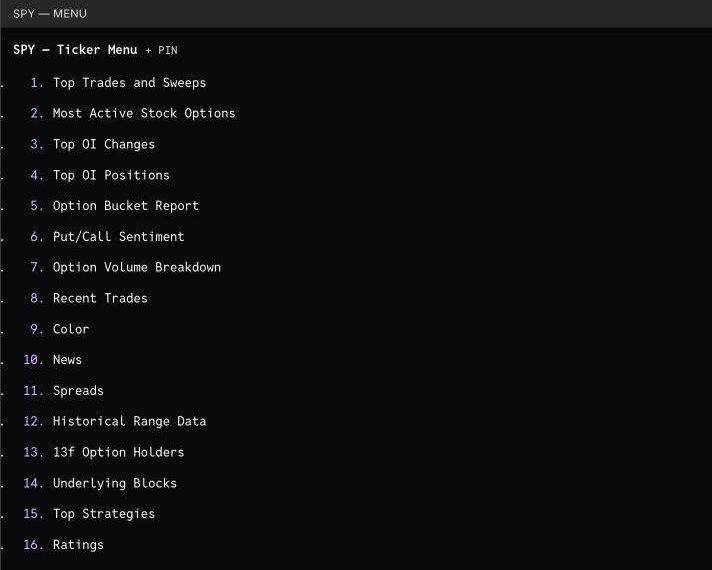
Ready to switch from CBOE Trade Alert?
Start a free trial and see the difference in minutes.